Credits measure Ideatura usage. They are separate from context capacity and workspace storage; one message is not a fixed number of credits.

1. Read the balance

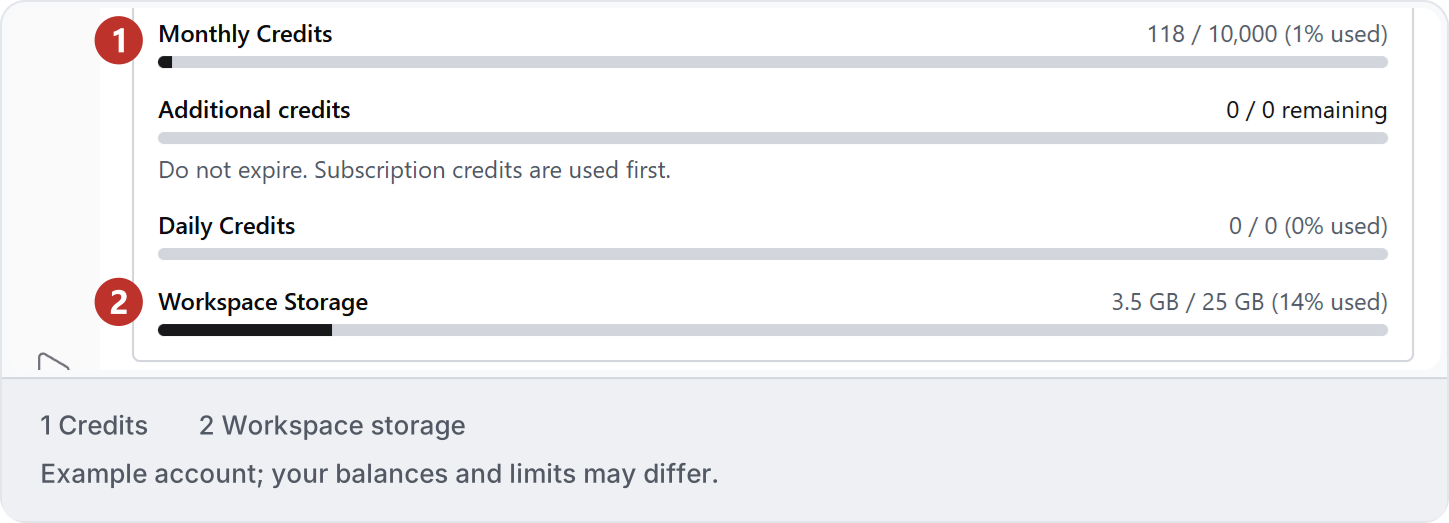
Open Settings → General and read each credit meter’s label, used amount and allowance. Check any reset information shown for your account. Workspace Storage is a separate measure. See Settings. Example Settings usage display: 1 Monthly, Additional and Daily Credits; 2 Workspace Storage. Your values may differ.
2. Separate task stages

Measure planning, creating or adapting an automation, and running saved work separately. A saved code automation and an AI Flow can involve different AI work during execution. Do not assume every saved run is free.

3. Include retries

Model choice, effort, processed context and repeated attempts can affect usage. Check current charging terms for failed or canceled work; do not assume a refund or a fixed credit-to-question conversion. If other work shares the balance, its usage can affect your measurement.

4. Measure a useful result

Record usage before and after one bounded task, including corrections and review. Compare the accepted result, not only the first response. The Models and credits reference gives a measurement sequence. If repeated attempts are not improving the result, use Troubleshooting.