A generated automation, a completed run and an accepted result are different milestones. Start at Run when using an existing automation; start at Generate when creating or changing one.

1. Generate

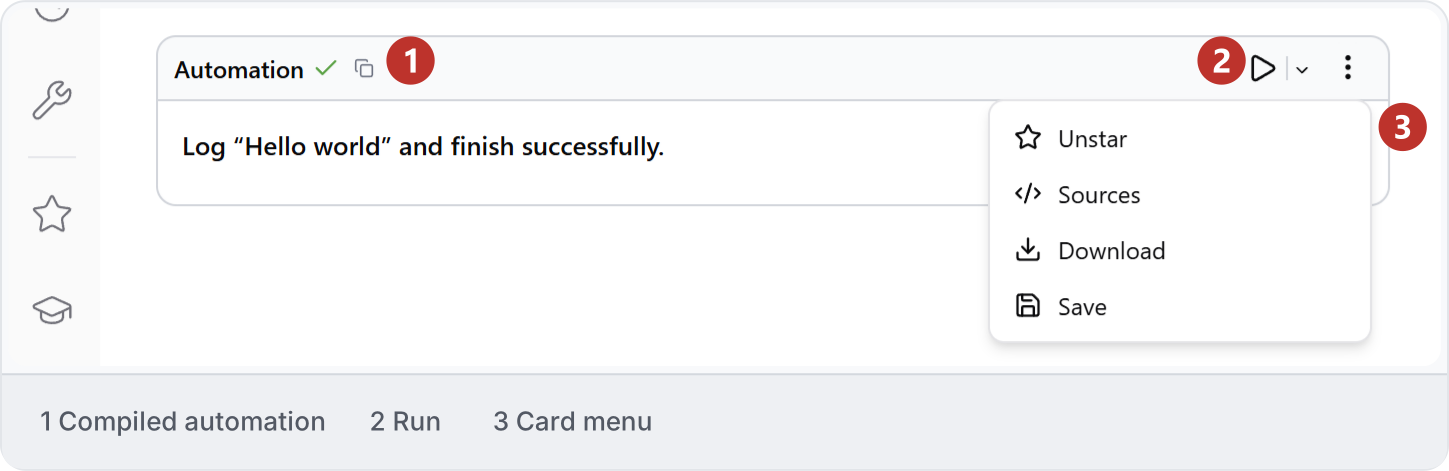
Describe the intended operation and review the proposed scope. Generated code or a card does not, by itself, show that the model changed. Direct actions in a conversation may execute separately: read the task activity and inspect the application. Saved Hello world automation card. The green check indicates compilation; use the run control and inspect the execution report to establish whether it ran.
2. Run

Confirm the application, document, view, parameters and intended treatment of existing output. Run one small scope. A manual Run action can have different consequences from an agent permission setting; read Modes and access.

3. Inspect

Compare the native result with the request. Check counts, references, omissions and unintended changes. A success message establishes neither completeness nor correct geometry. Use Review and recover.

4. Save

Save the accepted native document and the automation separately. Use a name that describes the operation and retain a known working version before adapting it. Follow Save an automation, then reopen the saved entry to confirm its identity and defaults.

5. Reuse

Test changed inputs on a small scope before a wider run. Decide whether existing output should be skipped, appended, replaced or updated. See Reuse across projects.

6. Share

Check the destination workspace, audience and editing rights. Confirm whether a colleague receives a copy and verify its parameters from their account. See Share an automation.