Start with your standards
Attach your company’s standards, a BIM execution plan or example drawings to a chat. Ask AI to extract the relevant instructions:Read the attached drawing standards. Draft Guidelines for units, view names, sheet numbering and annotation styles. List any conflicting rules or missing information separately.You can also ask AI to read conventions from the connected Revit or AutoCAD document:
Inspect the sheet names, title blocks and dimension styles in this project. Draft instructions for preparing new sheets in the same style. Distinguish consistent conventions from exceptions.Review the draft before saving it, especially rules inferred from an existing project.
Save Guidelines
Open Skills → Guidelines, edit the text and click Save. Keep the rules that should apply across your workspace here. Put a procedure for a specific task into a separate skill.Create a skill
- Open Skills → New skill.
- Enter a name that describes the task, such as Prepare room drawing sheets, and click Create.
- Add the instructions: what the task needs, how to carry it out and what the finished result should contain.
- Save the skill.

Create a skill from a chat
After a task works well, ask AI to summarize the method for reuse:Turn the approach we settled on into a skill. Include the drawing rules, required inputs and checks. Leave out the failed attempts and replace project-specific names with instructions for choosing them.Read the result and save it as a new skill. If you also created an automation, keep both: the automation repeats the task, and the skill explains the rules AI should follow when adapting it.
Attach or remove instructions
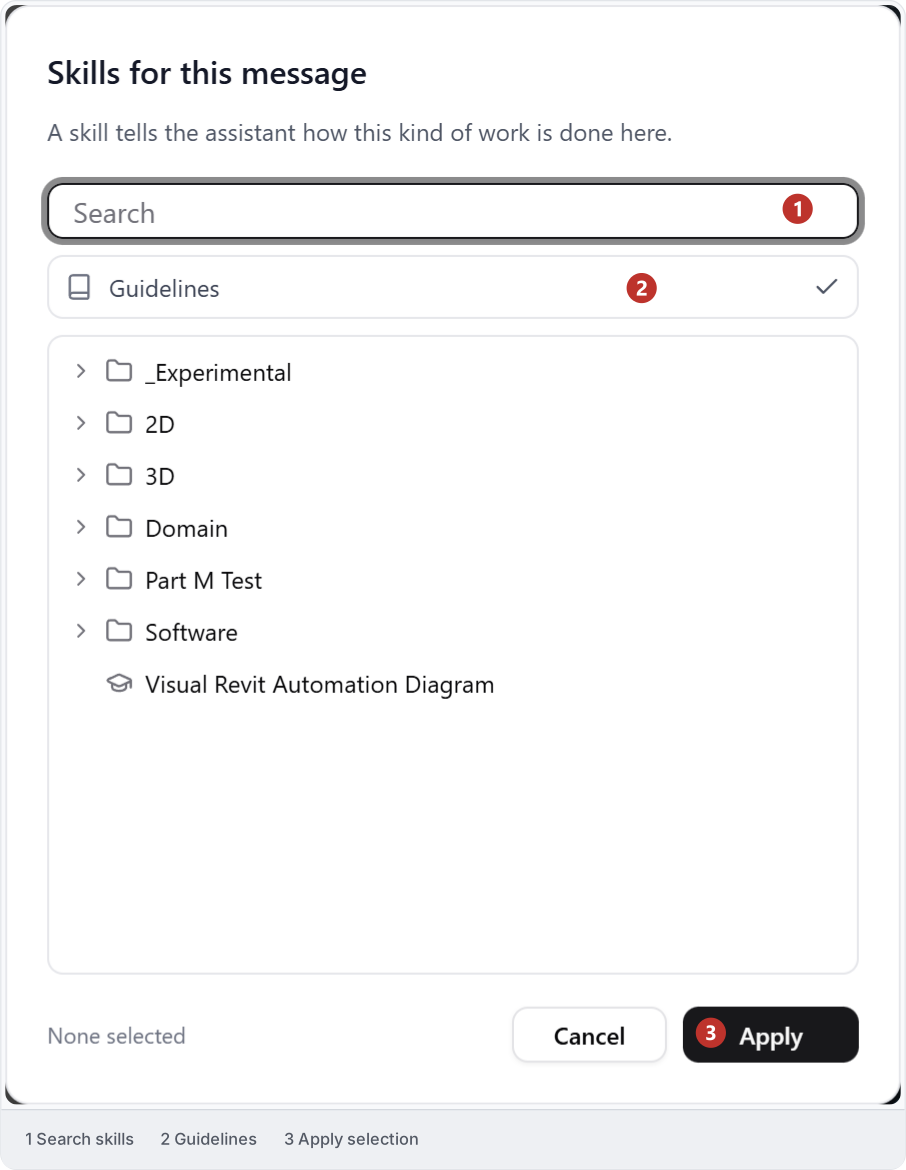
Before sending a message, open Skills for this message, select the skills you need and click Apply. The same picker includes Guidelines. To leave a skill or Guidelines out of the next message, uncheck it and click Apply. This removes the selection from the message; it does not delete the shared instructions or erase earlier messages that used them.